Bass Test
Probe low frequencies safely. Small speakers may not reproduce deep bass even when they are working correctly.
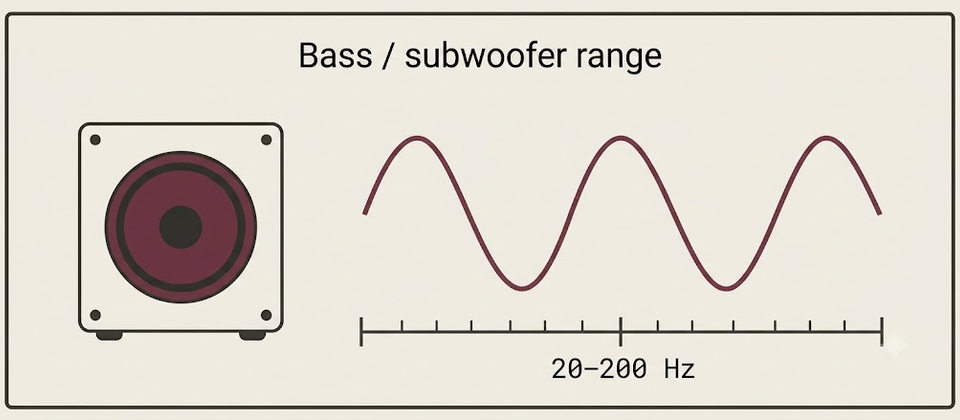
Bass / subwoofer test
Very low tones may be inaudible on small speakers. Not hearing a tone is different from not physically feeling or reproducing it.
Keep volume low. Sustained high-level bass can rattle rooms and stress small drivers or Bluetooth speakers.
Feeling versus hearing
At the lowest presets you may feel vibration more than hear a clear pitch. That can be normal. Not hearing 20–40 Hz on a laptop is usually a physical limit of tiny drivers — not proof that the device is broken. Compare with headphones or a powered subwoofer before concluding hardware failure.
Laptop speakers vs subwoofer
| Setup | What to expect |
|---|---|
| Phone / laptop speakers | Often roll off hard below ~80–120 Hz; deep bass may be inaudible |
| Headphones | Usually clearer low tones than built-in speakers |
| Powered subwoofer | Should reproduce much of the 20–200 Hz range if connected correctly |
Subwoofer troubleshooting
- Power and cable — many “dead bass” cases are unpowered subs or loose RCA/LFE leads.
- Crossover — if set too low, mains and sub leave a hole around 80–120 Hz.
- Placement — corners boost bass; mid-wall seats can sit in a cancellation null.
- Stereo / balance — if bass collapses only with both speakers, check left/right balance and seating with the left/right test.
- Bluetooth limits — small wireless speakers often roll off hard below 60–80 Hz.
Bass and subwoofer check
Use the low-frequency presets and bass sweep above to hear how much low end your setup can reproduce. Small speakers often cannot play deep bass even when they are working correctly — that is a size limit, not always a fault.
Keep volume moderate. Extreme low tones at high level can rattle furniture and stress tiny drivers.
20–200 Hz: what the range is for
- ~20–40 Hz — felt more than heard on capable subs; usually inaudible on laptops.
- ~40–80 Hz — kick-drum / deep bass region; needs a sub or larger drivers to sound solid.
- ~80–120 Hz — common crossover neighborhood between mains and a subwoofer.
- ~120–200 Hz — upper bass / lower mid warmth; many computer speakers still play here.
Step through presets, then run a short sweep if you want a continuous listen.
Feeling vs hearing
At the lowest tones you may notice vibration in a desk or couch more than a clear pitch. That can be normal with a powered sub. On a thin laptop, feeling almost nothing at 30 Hz is expected.
Before you replace hardware:
- Compare the same tone on headphones.
- Confirm the OS output is the sub/soundbar, not the laptop speakers.
- Check the sub’s power, input, and crossover knob/menu.
Laptop speakers vs headphones vs subwoofer
- Phone / laptop speakers — hard roll-off below ~80–120 Hz is common.
- Headphones — clearer low tones than most built-in speakers.
- Powered subwoofer — should cover much of 20–200 Hz if cabled and crossed over correctly.
- Small Bluetooth speakers — often weak below ~60–80 Hz.
Crossover and placement
- If the crossover is set too low, mains and sub can leave a hole around 80–120 Hz.
- Corners usually boost bass; some seats sit in a cancellation “null” mid-room — move a meter and retest.
- One RCA/LFE cable unseated is a common “dead sub” cause.
Stereo balance and collapsing bass
If bass disappears only when both speakers play, check channel balance and seating with the left/right test. Phase and placement issues can cancel low frequencies at the listening position even when each speaker alone sounds fine.
Bluetooth limits
Small wireless speakers prioritize loudness and battery over deep extension. Use this page to learn the floor of *your* device, then decide whether you need a sub or wired monitors — not whether the browser “failed.”
Weak bass next steps
- Power / cable / input on the sub.
- Crossover and volume on the sub vs AVR/soundbar.
- Placement: try a corner vs mid-wall seat.
- Full checklist: weak bass troubleshooting.
How to run this test usefully
- Pick the output you care about (laptop, headphones, or sub path).
- Play 80 Hz and 120 Hz first — most systems can reproduce these if anything can.
- Step downward (60 → 40 → 30 → 20 Hz) and note when tone becomes feel-only or disappears.
- Run a short bass sweep once at moderate level; stop if panels rattle.
- Change only one variable (seat, crossover, or cable) and retest.
AVR / soundbar sub outs
- Confirm the AVR speaker size is set so bass is redirected to the sub (often “small” mains).
- Match LFE / subwoofer output level roughly to the mains; a sub muted in the AVR menu is a frequent miss.
- If you use TV ARC/eARC into a soundbar, confirm the TV is not stripping low frequencies with a “night” or dialogue mode.
Desk setups without a sub
Expect limited extension. Use the bass page to learn your floor, then decide whether headphones or a small powered sub are worth adding. Do not keep raising volume at 30 Hz on 2-inch laptop drivers hoping for club levels — you will get distortion, not deeper bass.
Related checks
- Frequency generator for mid/high context
- Left/right test if bass collapses only in stereo
- Quick test for a fast “is anything playing?” baseline
- Weak bass checklist for ordered cable and crossover checks
Interpreting a “missing” 40 Hz
If 80–120 Hz is clear but 40 Hz vanishes on a laptop, that is usually physics, not a software mute. Confirm with headphones: if headphones still play 40 Hz, the laptop drivers are simply small. If headphones are also silent at 40 Hz while 120 Hz works, check EQ, “night mode,” or a limiter before replacing gear.
When a powered sub is in the chain, silence at 40 Hz with strong 80 Hz often means the crossover is too high, the LFE cable is on the wrong input, or the sub’s low-pass is defeating the tone. Change one control at a time and retest the same preset.
Related: quick speaker test, weak bass checklist. Last reviewed: 21 July 2026.
Frequently asked questions
Last reviewed: 21 July 2026
My laptop has no bass. Is it broken?
Not necessarily. Tiny drivers physically cannot move enough air for deep bass. Compare with headphones or a powered subwoofer before assuming failure.
Bluetooth bass sounds weak.
Codec limits, aggressive DSP, and small enclosures all reduce low-frequency output. Test with a wired connection when possible.
I feel vibration but hear little sound.
That can be normal at very low frequencies. Feeling motion without a clear pitch often means the tone is near the edge of audibility or room coupling.
Where should I set the subwoofer crossover?
Many stereo and home-theater setups land around 80–120 Hz. If vocals sound thin or boomy, try small adjustments and retest 60–150 Hz here.